最近进行博客重构,因此参照了 antfu 大神的博客的样式。
基本样式参照了其中,可是对于其中黑暗模式切换,被深深的吸引了,如下:

当时在想,这个是怎么做到的,为何这个动画如此丝滑,我得研究下;

放弃了~~~
直接吧啦源码,看到如下关键信息:
::view-transition-old(view-transition-name)::view-transition-new(view-transition-name)印象中,这段使用的是 View Transition API 中的内容;于是乎去翻阅各种文档;发现大佬这篇文章 页面级可视动画 View Transitions API 初体验,大佬深入浅出详细说明了此 API 的作用以及使用;这里不做过多的说明;
mark:View Transitions API 简化了复杂动画的实现,无需手动处理位置计算或动画控制,尤其适合页面级的场景切换和动画增强。
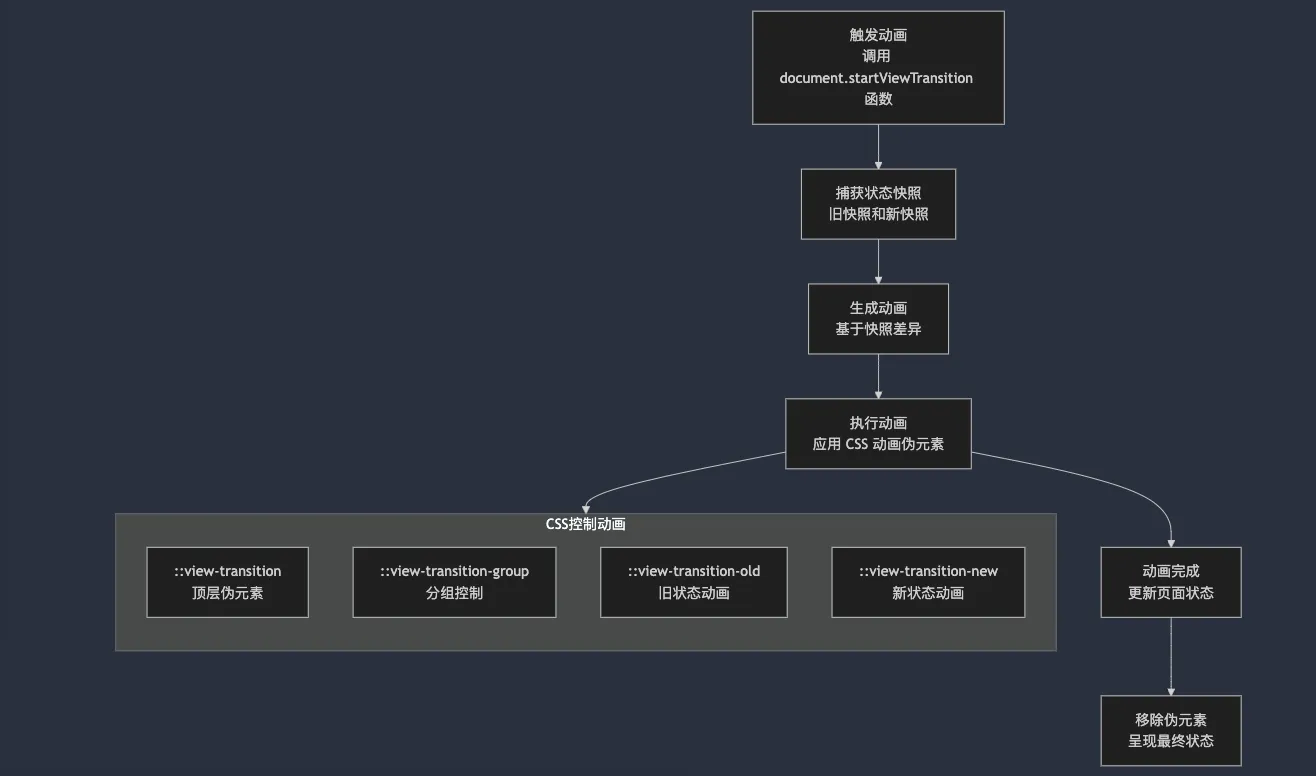
流程图说明h3
- 触发动画:用户通过调用
document.startViewTransition()开始动画。 - 捕获状态快照:浏览器在 DOM 更新前后分别捕获旧状态和新状态。
- 生成动画:浏览器对比新旧快照的差异,生成过渡动画。
- 执行动画:根据 CSS 控制动画的伪元素定义的规则执行动画。
- 动画完成:动画结束后更新页面状态。
- 移除伪元素:动画伪元素被移除,最终状态呈现。
如何扩散h2
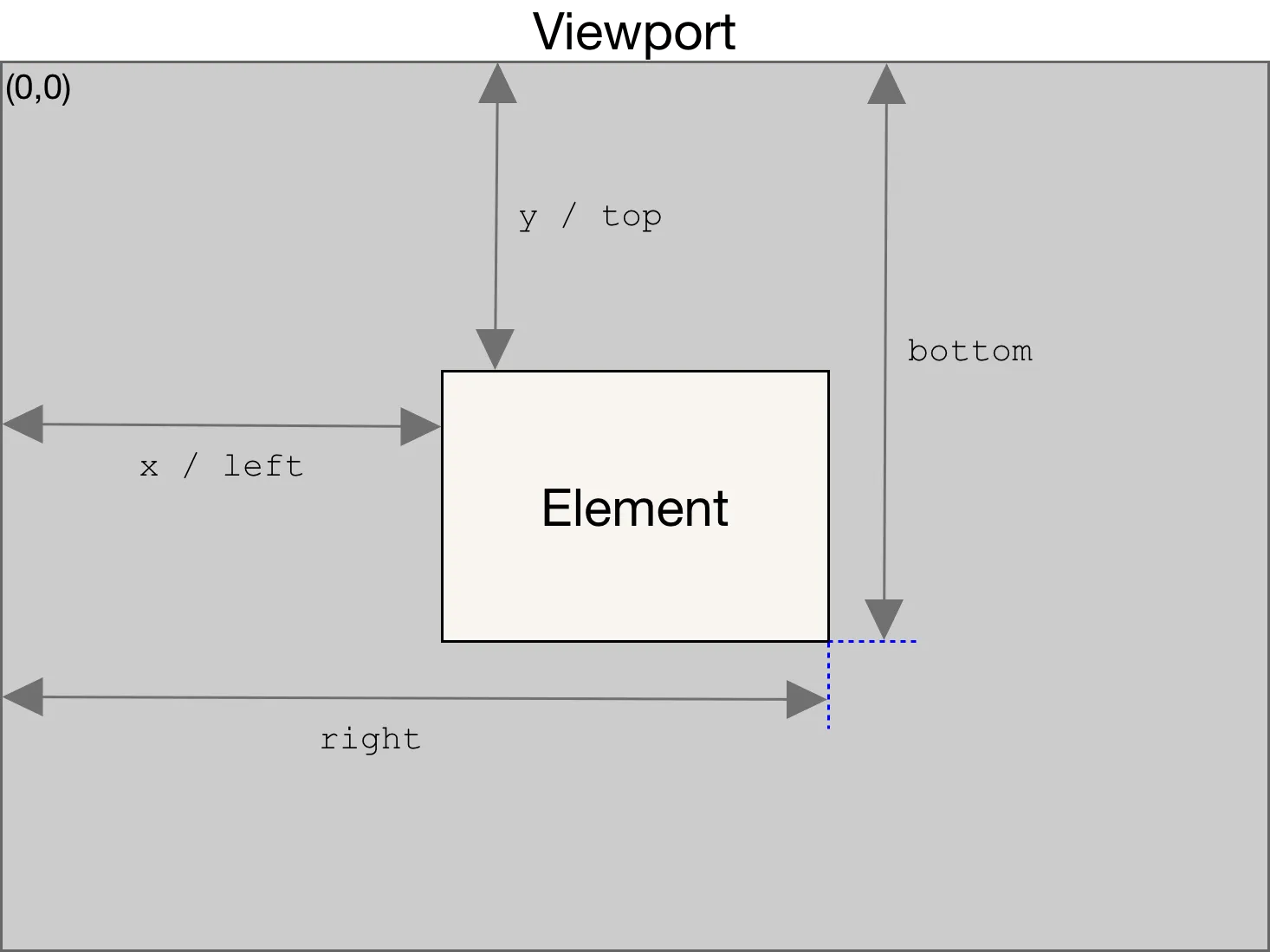
从上图显示效果而言,扩散是从一个点扩散到浏览器整体视窗;而视窗的最大半径我们可以通过鼠标点击或者 touch 事件来触发获取元素的 Element.getBoundingClientRect():
const rect = this.themeLabel?.getBoundingClientRect()boundingClientRect 包含两个 x 和 y,表示当前相对于视窗相对位置,借用 MDN 图:
而此时我们需要计算由我们点击位置向外扩散圆的半径;如下图:
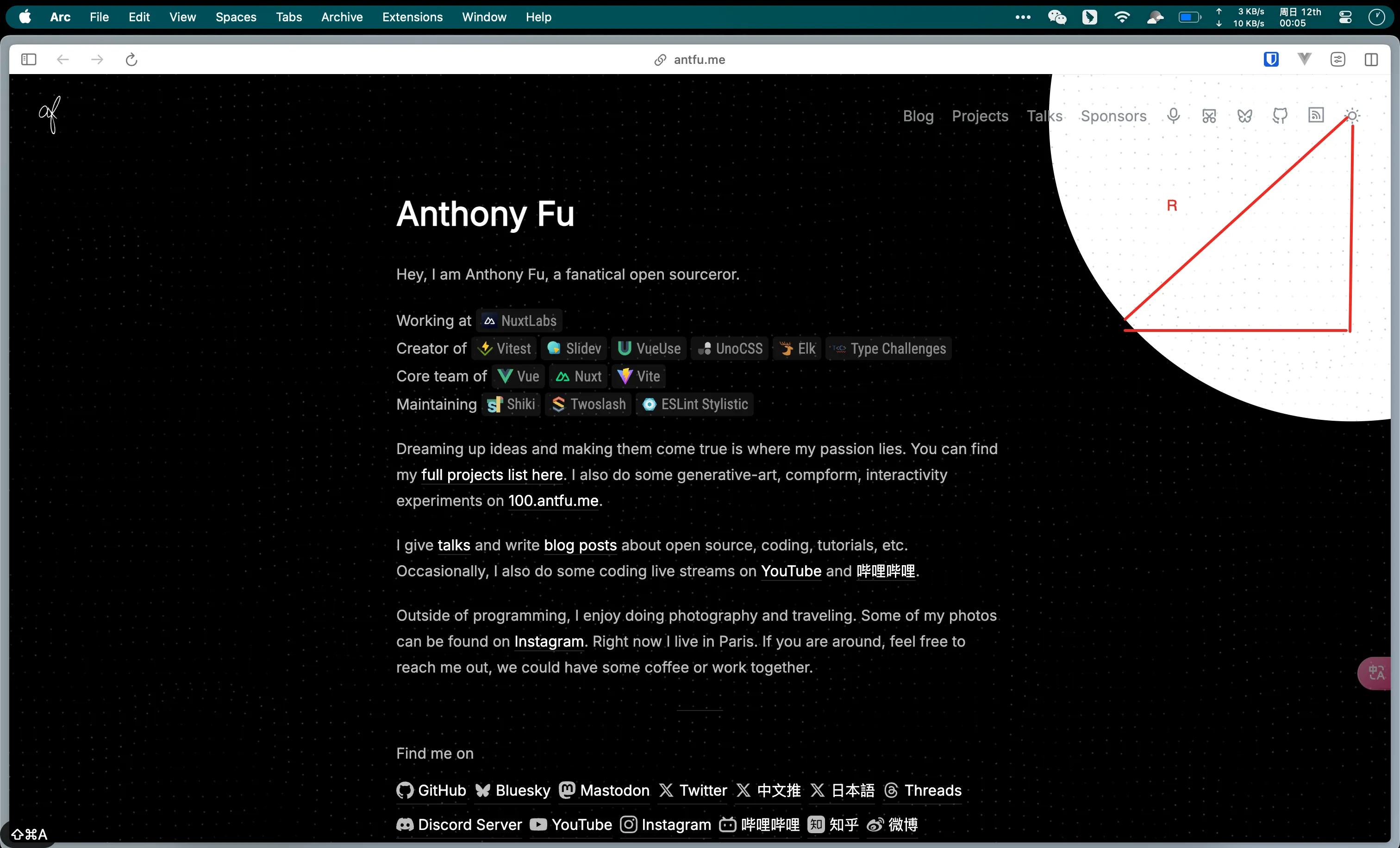
const radius = Math.hypot(Math.max(x, innerWidth - x), Math.max(y, innerHeight - y))Math.hypot计算直角三角形的斜边长度,确保动画覆盖整个视窗。Math.max确定从触发点到视窗边缘的最远距离,确保动画从中心点覆盖整个页面。
关于 innerWidthh3
innerWidth 是一个只读属性,返回窗口的文档显示区的宽度(以像素为单位)。它包括滚动条的宽度(如果有)。在计算动画扩散半径时,我们使用 innerWidth 来确定从触发点到视窗边缘的最远距离。
接下来我们定义动画绘画路径:
const clipPath = [`circle(0px at ${x}px ${y}px)`, `circle(${radius}px at ${x}px ${y}px)`]clipPath是一个数组,表示动画的起始和结束状态:- 起始状态:半径为 0 的圆(即无显示)。
- 结束状态:覆盖整个页面的圆(最大半径)。
创建动画h3
await document.documentElement.animate( { clipPath: currentTheme === 'dark' ? clipPath.reverse() : clipPath }, { duration: 350, easing: 'ease-out', pseudoElement: currentTheme === 'dark' ? '::view-transition-old(root)' : '::view-transition-new(root)', }).finished动画执行效果
- 切换到深色模式:
- 动画从大圆过渡到小圆(反转
clipPath)。 - 动画目标是
::view-transition-new(root)。
- 动画从大圆过渡到小圆(反转
- 切换到浅色模式:
- 动画从小圆过渡到大圆。
- 动画目标是
::view-transition-new(root)。
结合上面的流程图,在 view-transition 之后,使用 pseudoElement 精细控制新旧主题之间的过渡。
最终代码如下:【本次使用的是 WebComponent 进行组件的抽取】
<script>import { themeAtom } from "~/store";
class ThemeSwitcher extends HTMLElement {  private themeLabel: HTMLLabelElement | null = null;  private themeInput: HTMLInputElement | null = null;
  constructor() {    super();    this.initTheme();  }
  private getSystemTheme(): "light" | "dark" {    return window.matchMedia("(prefers-color-scheme: dark)").matches      ? "dark"      : "light";  }
  private initTheme(): "light" | "dark" {    const localTheme = window.localStorage.getItem("theme");    return localTheme === "auto"      ? this.getSystemTheme()      : (localTheme as "light" | "dark") || "light";  }
  private updateTheme(theme: "light" | "dark"): void {    document.documentElement.classList.toggle("dark", theme === "dark");    document.documentElement.style.colorScheme = theme;    document.documentElement.setAttribute("data-theme", theme);    this.themeLabel?.classList.toggle("swap-active", theme === "light");    themeAtom.set(theme);  }
  private async animateThemeTransition(x: number, y: number): Promise<void> {    const currentTheme = this.initTheme();    const radius = Math.hypot(      Math.max(x, innerWidth - x),      Math.max(y, innerHeight - y)    );
    const clipPath = [      `circle(0px at ${x}px ${y}px)`,      `circle(${radius}px at ${x}px ${y}px)`,    ];
    try {      await document.documentElement.animate(        { clipPath: currentTheme === "dark" ? clipPath.reverse() : clipPath },        {          duration: 350,          easing: "ease-out",          pseudoElement:            currentTheme === "dark"              ? "::view-transition-old(root)"              : "::view-transition-new(root)",        }      ).finished;    } catch (error) {      console.error("Animation failed:", error);    }  }
  connectedCallback(): void {    this.themeLabel = this.querySelector("label");    this.themeInput = this.querySelector("input");
    if (!this.themeLabel || !this.themeInput) {      console.error("Required elements not found");      return;    }
    const currentTheme = this.initTheme();    this.updateTheme(currentTheme);
    this.themeInput.addEventListener("click", async (event) => {      const currentTheme = this.initTheme();      const newTheme = currentTheme === "dark" ? "light" : "dark";
      try {        const transition = document.startViewTransition(async () => {          this.updateTheme(newTheme);          window.localStorage.setItem("theme", newTheme);        });
        await transition.ready;        const rect = this.themeLabel?.getBoundingClientRect();        if (rect) {          await this.animateThemeTransition(rect.x, rect.y);        }      } catch (error) {        console.error("Theme switch failed:", error);        // 回退方案        this.updateTheme(newTheme);        window.localStorage.setItem("theme", newTheme);      }    });  }
  disconnectedCallback(): void {    this.themeInput?.removeEventListener("click", () => {});  }}
customElements.define("switch-theme", ThemeSwitcher);</script>